
Last updated on
Nov 7, 2026

NY Substitute Form W-9 2017-2026 free printable template
pdfFiller is not affiliated with any government organization

Fill out
Complete the form online in a simple drag-and-drop editor.

eSign
Add your legally binding signature or send the form for signing.

Share
Share the form via a link, letting anyone fill it out from any device.

Export
Download, print, email, or move the form to your cloud storage.
Why pdfFiller is the best tool for your documents and forms


End-to-end document management
From editing and signing to collaboration and tracking, pdfFiller has everything you need to get your documents done quickly and efficiently.
Accessible from anywhere
pdfFiller is fully cloud-based. This means you can edit, sign, and share documents from anywhere using your computer, smartphone, or tablet.
Secure and compliant
pdfFiller lets you securely manage documents following global laws like ESIGN, CCPA, and GDPR. It's also HIPAA and SOC 2 compliant.
What is NY Substitute Form W-9
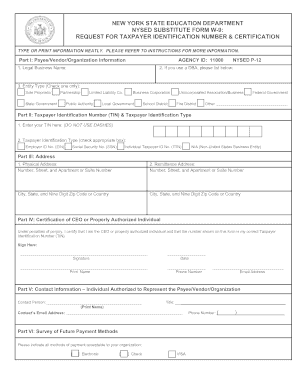
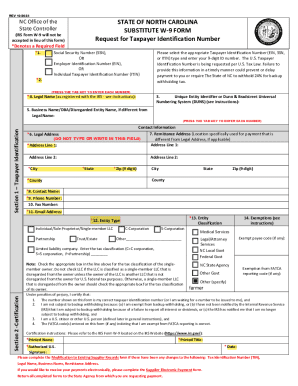
The New York State Substitute Form W-9 is a tax document used by vendors to submit their taxpayer identification number (TIN) to the New York State Office of the State Comptroller.
pdfFiller scores top ratings on review platforms




Who needs NY Substitute Form W-9?
Explore how professionals across industries use pdfFiller.

NY Substitute Form W-9 is needed by:
-
Vendors doing business in New York State
-
Organizations contracting with New York State
-
Tax preparers assisting New York taxpayers
-
Businesses needing to report income to New York State
-
Individual contractors providing services to New York State
Comprehensive Guide to NY Substitute Form W-9
What is the New York State Substitute Form W-9?
The New York State Substitute Form W-9 serves as a critical tool for vendors to furnish their taxpayer identification number (TIN) to New York State. This document is essential for individuals and organizations engaging in transactions with the state, facilitating compliance with tax regulations and helping to avoid backup withholding. By using the NYS vendor tax form, vendors can streamline the process of conducting business in New York.
Purpose and Benefits of the New York State Substitute Form W-9
The New York State Substitute Form W-9 is designed to meet specific objectives within New York State's tax framework. By filing this form, vendors not only comply with state requirements but also enjoy a range of benefits that simplify business transactions. These include expedited payment processes and clearer communication with state departments.
-
Ensures accurate reporting of taxpayer information
-
Avoids complications related to backup withholding
-
Facilitates smooth financial interactions between vendors and the state
Who Needs the New York State Substitute Form W-9?
This form is required for various entities, including sole proprietors, partnerships, corporations, and limited liability companies that conduct business with New York State. Vendors must understand the implications of using the New York State Substitute Form W-9 to ensure compliance with state tax requirements. Failure to complete this form accurately can lead to issues such as backup withholding.
How to Fill Out the New York State Substitute Form W-9 Online (Step-by-Step)
Filling out the New York State Substitute Form W-9 online can be an efficient process. Here is a step-by-step guide to help you:
-
Access the online form via a trusted platform.
-
Begin by typing or printing your information clearly in the designated fields.
-
Complete the sections for taxpayer identification and address accurately.
-
Pay special attention to the 'Type or Print Information Neatly' section.
-
Sign in the appropriate field, ensuring that the signature is from an authorized representative.
Common Errors to Avoid When Completing the New York State Substitute Form W-9
Users frequently encounter pitfalls when completing the New York State Substitute Form W-9. Here are some common errors to be aware of:
-
Failing to provide a signature where required
-
Incorrectly filling out the taxpayer identification number
-
Omitting required information in the contact details section
To enhance accuracy, refer to a validation checklist to confirm that all necessary fields are completed correctly before submission.
How to Sign the New York State Substitute Form W-9 and Submit It
Signing the New York State Substitute Form W-9 can be accomplished using a digital signature, which is often more convenient. Vendors also have the option of using a wet signature if preferred. Submitting the form can be done through electronic channels or physical mail, depending on the vendor’s preference and the requirements set forth by the state.
What Happens After You Submit the New York State Substitute Form W-9?
After submitting the New York State Substitute Form W-9, vendors can expect a confirmation of receipt. Tracking options may be available to monitor the processing status of the form, which ensures that vendors remain informed about the progress of their submission. Understanding the timeframes involved in the processing of the form can aid in planning future business activities.
Sample of a Completed New York State Substitute Form W-9
A completed example of the New York State Substitute Form W-9 can clarify how the form should be filled out. Key sections typically include the vendor’s name, TIN, address, and signature fields. This visual representation helps users accurately complete their own forms, highlighting common responses and formatting styles for clarity.
Security and Compliance for Handling the New York State Substitute Form W-9
When dealing with sensitive information, such as taxpayer identification numbers, security must be a top priority. It is imperative to ensure that all measures, including 256-bit encryption and compliance with HIPAA and GDPR regulations, are in place when managing data. pdfFiller provides robust security features to protect users' information while completing tax forms.
Effortlessly Complete Your New York State Substitute Form W-9 with pdfFiller
pdfFiller offers an array of features designed to simplify the process of filling out, signing, and submitting the New York State Substitute Form W-9. Users can create and manage forms efficiently and securely, benefiting from a cloud-based platform that is both accessible and user-friendly.
How to fill out the NY Substitute Form W-9
-
1.To access the New York State Substitute Form W-9, visit pdfFiller's website and search for the form using the search bar. Once located, click on the form to open it in the editor.
-
2.Familiarize yourself with the layout of the form in pdfFiller. Use the 'Fill' option to begin entering information in designated fields, ensuring you click on each field to initiate text entry.
-
3.Before filling out the form, gather the required information including your taxpayer identification number (TIN), your address, and details of your primary contact. Have this information ready for a smoother filling process.
-
4.Carefully complete all fields related to vendor information, including name, address, and TIN. Use clear, legible text and follow any instructions provided on the form, such as using the correct format for the TIN.
-
5.Once the form is filled out, review all the entered details to ensure accuracy. Check for any missed fields, and confirm that you've signed where required by clicking on the signature field.
-
6.After completing the review, use the 'Save' option in pdfFiller to save your work. You can also choose to download the form to your computer or submit it directly through the platform, if applicable.

Who is required to fill out the New York State Substitute Form W-9?
Individuals and organizations that engage in business transactions with New York State must complete the New York State Substitute Form W-9 to avoid backup withholding.
What information do I need to complete the form?
Before starting the form, you should gather your taxpayer identification number (TIN), your address, and the name and contact information of the primary representative.
Can the form be submitted electronically?
Yes, you can submit the New York State Substitute Form W-9 electronically through platforms like pdfFiller. Make sure to follow any specific submission instructions provided.
What happens if I fail to submit the form?
Failing to provide the form when required can lead to backup withholding on payments received, which means that a portion of your income might be withheld for tax purposes.
Are there any deadlines for submitting the form?
While the form itself does not have a specific deadline, it is advisable to submit it as soon as you begin doing business with New York State to avoid delays in payment.
What common mistakes should I avoid when filling out the form?
Ensure you accurately enter your TIN, and double-check for any typos in your name and address. Neglecting to sign the form can also lead to processing issues.
How long does it take to process the form once submitted?
The processing time for the New York State Substitute Form W-9 can vary, but it typically takes several weeks. Check with the New York State Office of the State Comptroller for specific timelines.
NY Substitute Form W-9 Form Versions
Related Content
Related Forms




Related Catalogs
Get the latest insights from our blog


If you believe that this page should be taken down, please follow our DMCA take down process
here
.
This form may include fields for payment information. Data entered in these fields is not covered by PCI DSS compliance.